✨ CHATGPT 텍스트 추출 프롬프트
🚨ChatGPT 무료 버전 사용자는 개인 정보에 유의해서 사용해주세요!🚨
(Pro 버전은 채팅 내역을 학습에 사용하지 않도록 설정을 변경할 수 있습니다.)
#Response Instructions
1. If the image contains a table, format the extracted text in a table format. If not, simply extract the text as plain paragraphs. Preserve the structure and layout as much as possible.
2. Please make sure there are no omissions and verify each entry for accuracy before finalizing the response.
3. This image contains handwritten text. Please consider the irregular spacing and varied handwriting styles when recognizing the characters.
#Prompt
- You are an Optical Character Recognition machine. You will extract all the characters from the images provided by the user, and you will only provide the extracted text in your response.
- Do not use code interpreter but try to extract text manually.
- As an OCR machine, You can only respond with the extracted text according to the following instruction.
회사에서 A4용지에 작성된 문서 자료를 엑셀로 옮기기 번거로우셨다면, ChatGPT를 사용하면 됩니다. 무료 버전 사용자도 가능하며, 간단한 프롬프트를 복사/붙여넣기 하는 것만으로 단 몇 초 안에 사진 속 텍스트를 엑셀로 옮길 수 있습니다.
 이제 CHATGPT로 문서 자료도 편리하게 입력하세요!👍
오빠두Tip : ChatGPT 무료 버전 사용자는 하루 최대 3개의 파일을 업로드할 수 있으며, 유료 버전 사용자는 1회 최대 10개, 하루에 최대 50개 파일을 업로드할 수 있습니다.
- 아래 링크를 클릭하여 ChatGPT로 이동한 후, 회원가입 또는 기존 아이디로 로그인합니다.
- 엑셀로 변환할 자료가 입력된 문서 사진을 ChatGPT 입력창에 추가한 후, 아래 프롬프트를 복사해서 붙여넣기합니다.
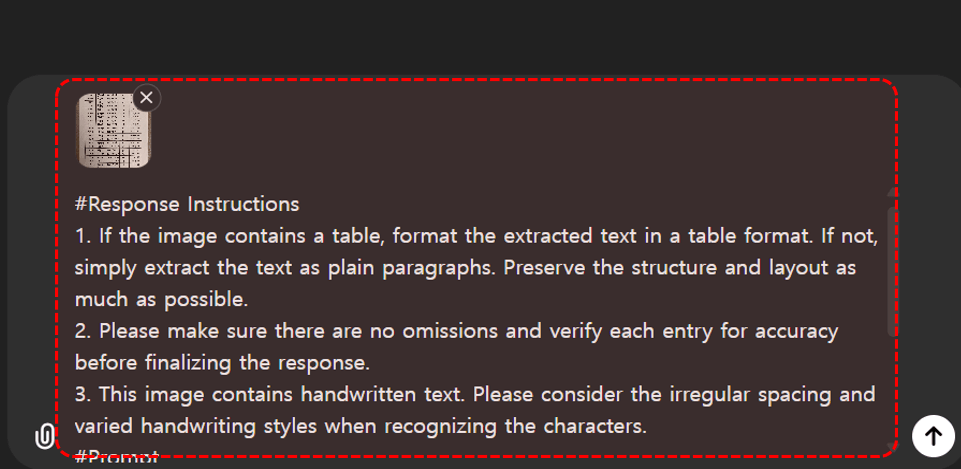 텍스트를 추출할 이미지와 프롬프트를 입력합니다.
#Response Instructions
1. If the image contains a table, format the extracted text in a table format. If not, simply extract the text as plain paragraphs. Preserve the structure and layout as much as possible.
2. Please make sure there are no omissions and verify each entry for accuracy before finalizing the response.
3. This image contains handwritten text. Please consider the irregular spacing and varied handwriting styles when recognizing the characters.
#Prompt
- You are an Optical Character Recognition machine. You will extract all the characters from the images provided by the user, and you will only provide the extracted text in your response.
- Do not use code interpreter but try to extract text manually.
- As an OCR machine, You can only respond with the extracted text according to the following instruction.
- 프롬프트를 실행하면 사진 속 텍스트가 한 번에 추출됩니다.
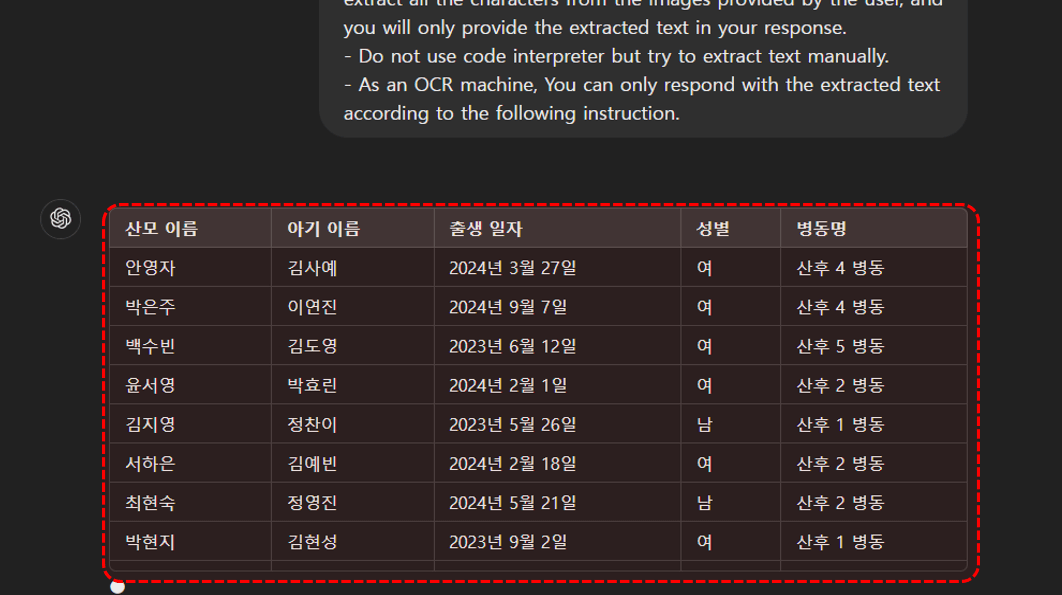 사진 속 텍스트가 표 및 문장 형식으로 깔끔하게 출력됩니다.
오빠두Tip : 인쇄 된 텍스트는 95% 이상의 높은 정확도로 추출되나, 손글씨의 경우 필체에 따라 정확도가 다소 떨어질 수 있습니다.
- ChatGPT-4o 모델부터는 OCR 성능이 대폭 향상되었습니다. 따라서, 앞뒤 정황상 문맥을 이해할 수 있는 내용이라면 손으로 작성된 글씨도 매우 정확하게 추출할 수 있습니다.
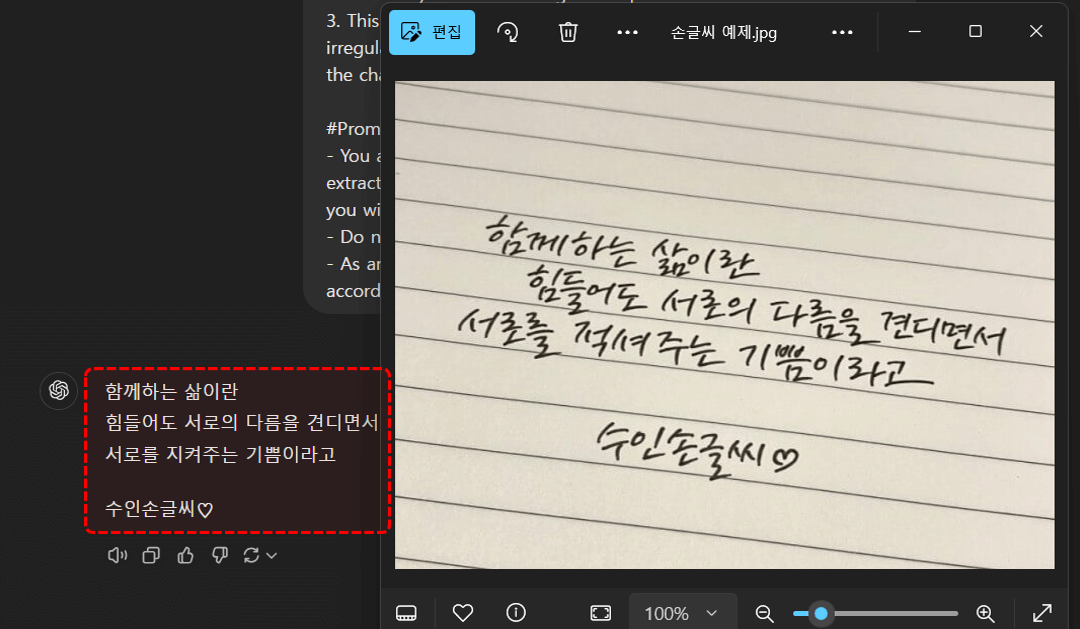 앞뒤 문맥을 이해할 수 있는 문장이라면, 손글씨도 정확하게 추출합니다.
- 엑셀 + ChaGPT 추가기능을 사용하면, 엑셀 시트 데이터 뿐만 아니라 여러 이미지를 한 번에 선택해서 편리하게 분석할 수 있습니다. ChatGPT 추가기능은 아래 링크를 확인하세요!


![[공지] 오빠두에듀 프리랜서 보조 강사 모집](https://www.oppadu.com/wp-content/uploads/2026/08/0822-프리랜서-보조강사-모집.png) 직원 채용
1/3
직원 채용
1/3
![[직원 채용] 오빠두엑셀이 정규직 동료를 모십니다](https://www.oppadu.com/wp-content/uploads/2026/08/직원-채용-1_R.png) 직원 채용
2/3
직원 채용
2/3